

If you have ever tried running a remote business or taking a work call from a dead zone where cellular bars barely register—you already know the frustration of legacy rural internet.
For years, living or traveling outside fiber coverage meant choosing between two equally painful options: paying steep monthly bills for aging DSL lines that barely hit 10 Mbps, or locking into rigid multi-year contracts with geostationary satellite providers (like HughesNet or Viasat) where a single heavy raincloud knocks out your connection for the afternoon.
When we first invested in our own Starlink hardware—testing both the Starlink Standard (Gen 3 V4) and the Starlink Mini across remote mountain highlands and torrential tropical storms—we wanted to see if SpaceX’s Low Earth Orbit (LEO) constellation could genuinely replace fixed broadband. Fast forward to late 2026, and it has completely transformed how we work off-grid and test mobile connectivity.
If you have been researching Starlink in the US lately and wondering where the famous “1-Month Free Trial” referral promo went—or how the new $100 cash payout works—here is everything you need to know based on our daily hands-on testing, with zero sales fluff.
Wait, What Happened to the “1-Month Free” Starlink Promo?
Let’s clear up the biggest point of confusion circulating in Starlink forums right now. If you are looking for a referral link that gives you a “free first month of service credit,” SpaceX officially retired that structure.
In a major policy update rolled out in October 2026, Starlink overhauled its entire subscriber reward program:
- Flat $100 Reward (US Accounts): Instead of issuing a single-month service voucher (which varied in value depending on your plan), Starlink now gives both the new buyer and the referring subscriber $100 each in the United States.
- Direct Bank Cash-Out or Bill Credit: For the first time, Starlink allows users to either transfer that $100 directly to a bank account as cash or apply it automatically as a service credit toward upcoming monthly statements.
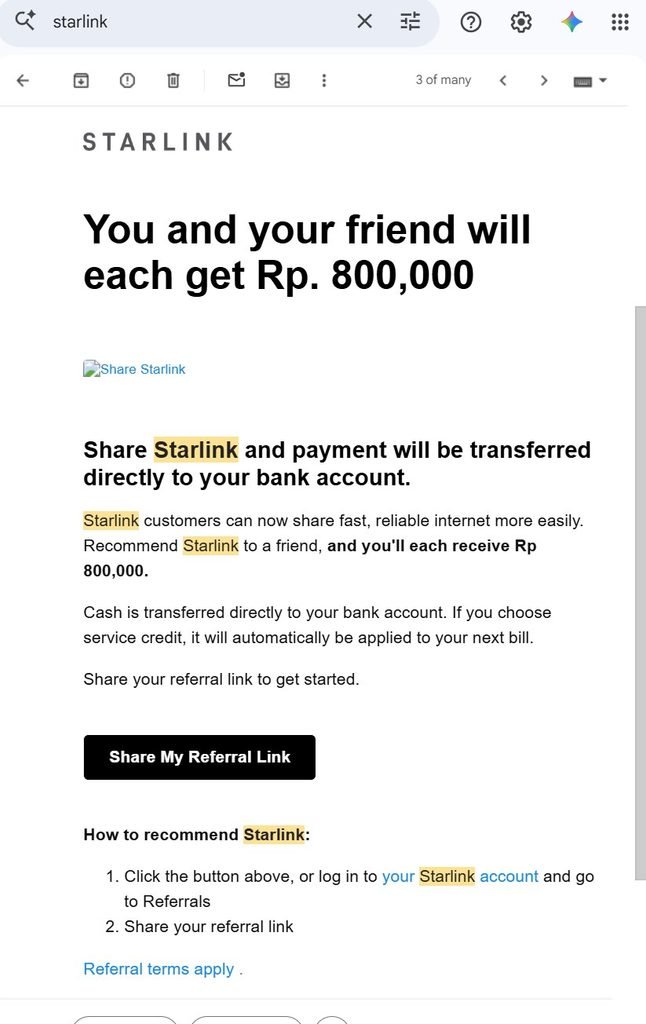
Why Our Screenshot Shows Rp 800,000 (Full Testing Transparency):
The image above is an authentic screenshot of the official policy update email SpaceX sent to our primary testing account on October 15, 2026. Because our off-grid field testing lab operates out of the remote highlands of South Sulawesi, Indonesia, our account dashboard displays the local regional equivalent (Rp 800,000).
However, Starlink’s global referral system works automatically based on the buyer’s shipping address and billing currency. When you order a kit in the United States using an active subscriber’s referral link, the system automatically adjusts the payout to $100 USD for US accounts, unlocking the exact same cash payout or bill credit options once your service remains active past the qualifying period.
Real-World Experience: How Starlink Actually Performs in 2026
Before you spend money on hardware, a $100 bonus only matters if the internet connection actually holds up. Because we test our dishes in mountainous terrain with heavy cloud cover and frequent downpours, our environment serves as a worst-case stress test for North American rural homeowners and RVers.
1. Real Speeds and Latency Under Pressure
Legacy satellite providers orbit roughly 22,236 miles above the Earth, creating 600ms+ latency that ruins Zoom calls, Wi-Fi calling, and online gaming. Starlink’s LEO satellites orbit around 340 miles up. Across our daily field tests on the Standard V4 and Mini dishes, here is what we consistently record:

- Download Speeds: 130 Mbps to 260 Mbps on clear days, holding steady at 120 Mbps to 180 Mbps even during heavy rainstorms (more than enough for multiple 4K streams and large cloud backups).
- Upload Speeds: 15 Mbps to 30 Mbps, which easily handles live video broadcasting and large Google Drive uploads.
- Latency (Ping): 25ms to 40ms, feeling nearly indistinguishable from urban cable internet during real-time video calls.
2. The 15-Minute DIY Setup (And Off-Grid Power)
You don’t need to wait three weeks for an installer truck. When the box arrives, you download the Starlink app, use your phone camera to scan the sky for obstructions, set the kickstand down, and plug in a single cable. In our field deployments, going from an unopened box to an active Wi-Fi network takes under 15 minutes—and if you pick up the Starlink Mini, you can even run it directly off a portable 500Wh camping power station during blackouts or road trips.
3. The Honest Cons (Who Should Skip Starlink)
Do not buy Starlink if:
- You already have reliable Fiber or Cable: If you live in a US city or suburb with $60/month gigabit fiber, stick with fiber. Satellite internet cannot beat underground fiber optic lines on raw speed or cost.
- You cannot clear dense tree cover: Whether it is tall pine and oak trees in the US Pacific Northwest or dense tropical foliage at our testing site, Starlink requires a wide, unobstructed view of the sky. If you cannot mount the dish on a roof pole or clear the tree line, you will experience micro-dropouts during live video calls.
How the $100 Cash / Service Credit Referral Works in the US
Because SpaceX spends very little on traditional advertising, they rely on active subscribers sharing their setups with rural neighbors, cabin owners, and RVers.
Here is why the October 2026 update is a major upgrade for US buyers:
- Direct Cash Transfer Option: You are no longer restricted to store credit. Once your account clears the initial activation window (typically 30 to 60 days after activation, depending on your billing cycle), Starlink lets you deposit the $100 reward directly into your bank account.
- Automatic Bill Credit: Prefer to lower your monthly internet expense? Select “Service Credit” and the $100 is automatically deducted from your upcoming monthly invoice.
- 30-Day Hardware Money-Back Guarantee: Starlink still honors its 30-day hardware return window in the US. If you set up the dish at your rural home or campsite and tree obstructions block your signal, you can return the hardware within 30 days for a full equipment refund—with no multi-year early termination fees.
Step-by-Step: How to Claim the $100 US Starlink Bonus
If you have checked your local ISP options and decided Starlink is the right fit for your home, cabin, or RV, do not order through a blank browser tab—otherwise, the $100 reward will not attach to your account.
- Activate the Referral Offer: Use our verified Starlink Subscriber Referral Link (Ad – Both of us receive a $100 reward after the qualifying active period; ordering without a referral yields $0).
- Select Your Hardware & Plan: Choose either the Residential Plan (best for fixed rural homes) or the Roam Plan (best for RVs, campers, and portable Starlink Mini users).
- Redeem Your $100: Once your dish arrives, is activated, and remains active past the qualifying trial window, Starlink will send an official email notification allowing you to transfer the $100 cash to your bank account or apply it to your next bill.
Frequently Asked Questions (FAQ)
Can I pause my Starlink service if I only use it for summer RV trips?
Yes. If you subscribe to a Starlink Roam plan, you can pause and unpause your monthly billing through the Starlink app. You only pay for the billing cycles when your service is active.
How does Starlink handle heavy rain or US winter snow?
In our real-world torrential rain tests, download speeds dip slightly during the heaviest cloudbursts but rarely drop below 100 Mbps, recovering as soon as the storm cell passes. For US users in northern states, both the Standard and Mini dishes feature a built-in automatic snow-melt mode in the Starlink app, which gently warms the dish surface so snow and ice slide off without manual scraping.
Have questions about choosing between the Starlink Standard V4 and Starlink Mini, or running Starlink off a portable power station? Drop a comment below with your setup situation and we will share what worked in our field tests!